The Map
List View


 Flusshinweise
Befahrbarkeit
English Summary
Karte Einbetten
Systemstatus
Kontakt und Team
Datenlieferanten
Overview
Download
Rivermap Japan
 "Rivermap Supporter" Group
Overview
Rivermap is a tool for European kayakers and canoeists that presents up-to-date information on the paddling conditions of various river sections. It combines an informative map overiew with the ability to access detailed information for each specific section. Below is a stripped-down example.Example: Upper Inn
(or view The Map)
Section respesentation
Lines between put-in and take-out points symbolize each section.
Water conditions
Section water levels are colour coded on the following scale, where possible:
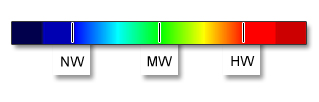
NW: low
water, the minimum needed
MW: medium water, consistent with the grade
The qualifier 'Indirect calibration!' designates a guage that may be only loosely or occasionally correlated with current levels on the section in question.
Indirect effects such as heavy upstream rainfall, snow melt, or transient hydro releases may dominate the paddling conditions.
Always do your homework.
For further information
Feel free to contact the team with any questions.Warnings
The measurement data are unvalidated and provisional.
The
classification is only a rough idea of the situation.
Always check the current flow conditions before starting a trip and
make additional clarifications (guide book, experts, inspection).
The decision to get on the water is always taken at your own risk, and all liability is disclaimed.
Full disclaimer (DE)